If you DJ without Mixed In Key, a new download comes with what its tags hold, and no cues. Cabine 0.12 analyses the audio of each of those tracks and puts hot cues on the starts of its sections, each with its energy level. It also adds smart playlists: write a few rules and the playlist keeps itself up to date as your library grows. And it reads the new beatgrids from Serato DJ Pro 5, Flexible grids included.
Cabine is our DJ library app for Mac, in free beta.
Hot cues and energy
On a track with no cues, Cabine finds the sections in the audio, counted on the track’s beatgrid from bar 1, and puts 6 to 8 cues on the section starts. Each cue is named “Energy” and a number from 1 to 10, the energy of the section it starts, the way Mixed In Key names its own. The track gets an energy value too: the energy of its highest section.
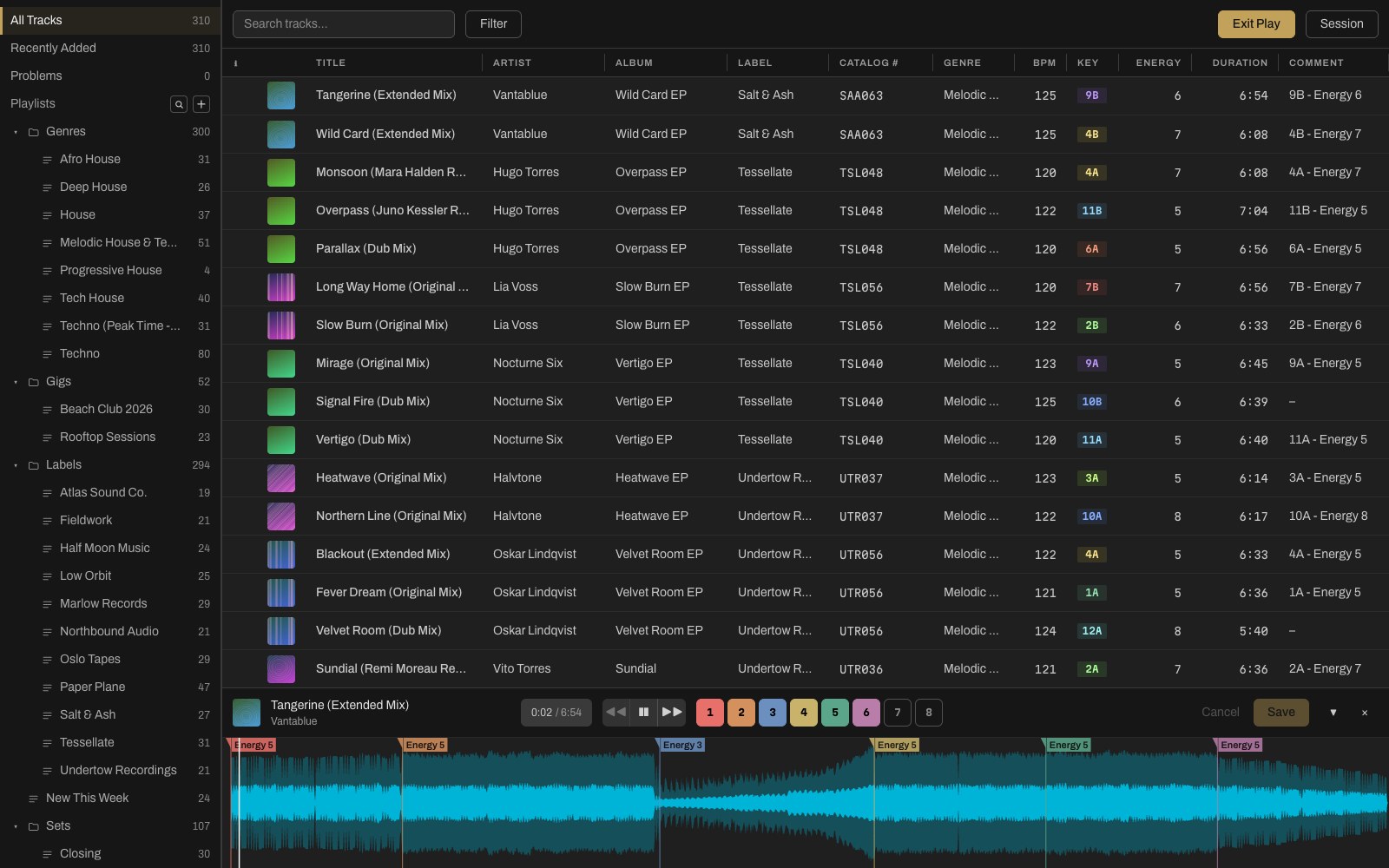
You do not have to start anything: after an import, Cabine finds the cues and the energy in the background, on your Mac, with the key, the BPM and the grid. The cues go out to Rekordbox and to the USB stick like any other cue, and they reach Serato when you export to it.
Cues from Mixed In Key, Serato or Rekordbox always win: Cabine only fills the tracks that have none.
We compared Cabine’s energy with Mixed In Key’s on 3,666 tracks of our own library: it is within one point on 97% of them.
Smart playlists
A smart playlist holds the tracks its rules match, and it updates itself when the library changes. A rule is a field, a condition and a value, like a smart crate in Serato: “Genre contains house”, “Genre does not contain tech house”, “BPM from 120 to 125”. The playlist can match all the rules or any of them.
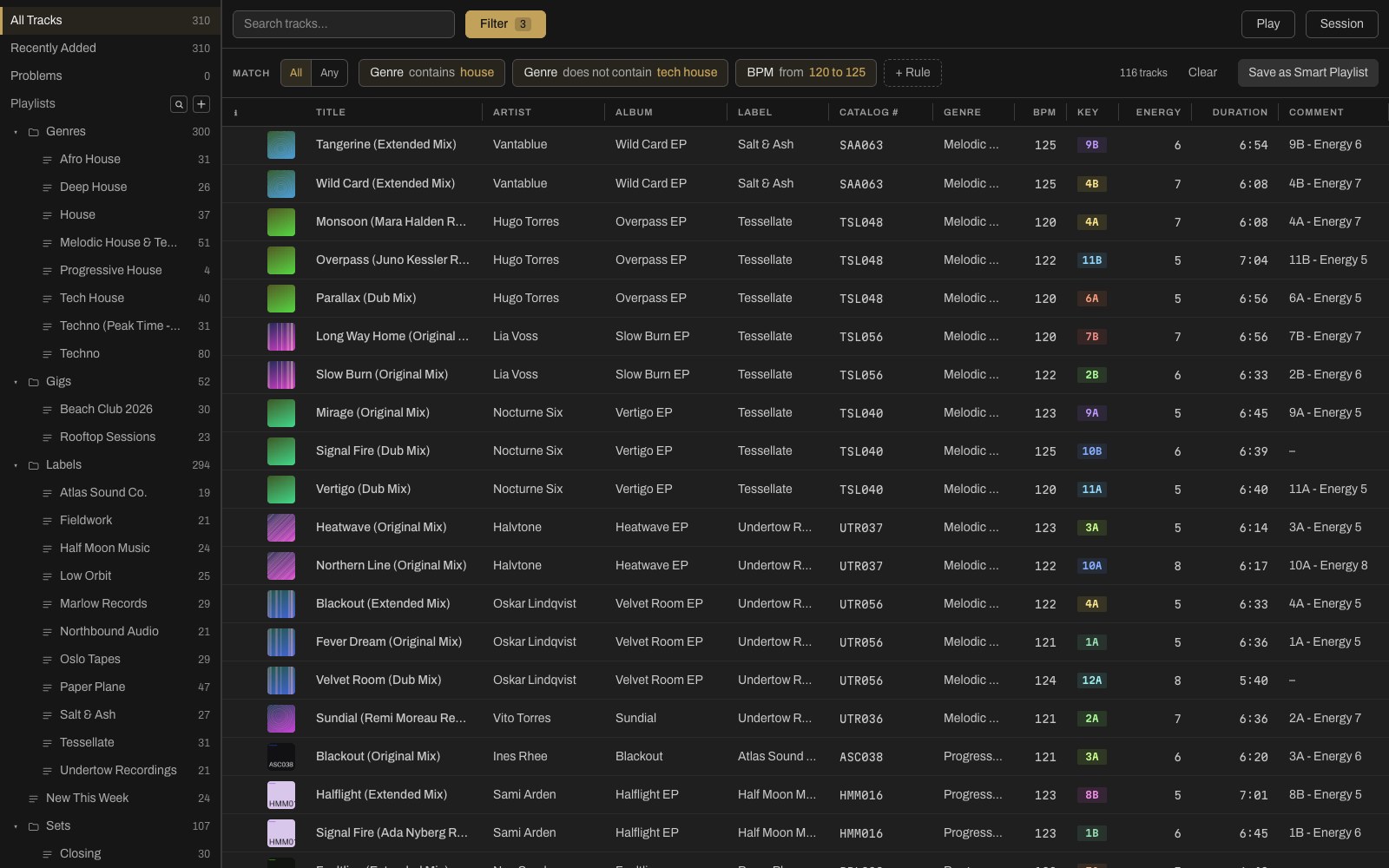
You can filter on artist, title, album, genre, label, comment, key, BPM, energy, year, format, tracks added in the last days, and playlist. “Key is compatible with 8A” takes 8A, its neighbours on the Camelot wheel (7A and 9A) and 8B, for harmonic mixing. Playlist lets you leave tracks out: “Playlist is not Played Sets” removes a playlist, or a whole folder of them.
Text rules ignore case and punctuation. “blondish” finds BLOND:ISH, Blond:Ish and BLONDISH, however each file spells it.
You build a smart playlist where you can see the tracks. Choose New Smart Playlist in the + menu above your playlists, or in the File menu. All Tracks opens with the rules above it, and the list narrows with each rule you add. When you type a value, Cabine suggests the ones in your library, with how many tracks have each. Click Save as Smart Playlist at the end of the rules, and give it a name.
When you export to a USB stick, to Rekordbox or to Serato, a smart playlist goes out as a normal playlist (a crate in Serato) with the tracks it matches at that moment. Export again to bring in the new ones.
Serato 5 grids
Serato DJ Pro 5.0 writes a new kind of beatgrid, with Fixed and Flexible grids. Cabine now reads both and sends them unchanged to Rekordbox and to the USB stick, so the booth plays the grid you set in Serato. Before 0.12, a track analysed in Serato 5 reached Cabine without its Serato grid.
A Flexible grid follows a track whose tempo moves. In our own library, it followed the pitch effects in Roswell Brothers’ “Closed World” and Disco Dom’s “The Apex”, which a single-tempo grid cannot follow.
Grids for new downloads
A new download with a BPM tag and no grid now gets a beatgrid from Cabine’s own analysis. With it come the beat lines in the editor, the cues and the energy. Tools → Analyze runs the analysis again on the tracks you select.
Smaller changes
- We redesigned the player and the editor. The editor is now the player at a taller height, and you can close it from either height.
- In the light theme, the brass text is darker and easier to read.
- Help → Install Command Line Tool puts the
cabinecommand in your terminal, andcabine startopens the app. AI agents can create smart playlists from it too:cabine crates create "Warm" --rule "genre contains house" --rule "bpm between 120 125".
As before, the app sends nothing and collects nothing.
Join the beta
You need a Mac with Apple Silicon and macOS 15 Sequoia or later. The app is in English. Sign up on the Cabine page, and we’ll send you an invite to download. If you are already a tester, download 0.12 with the address you signed up with.